
Turning off active status on Instagram controls activity indicators and last-active visibility. It is not the same as making an account private, changing read receipts or muting notifications. A useful privacy choice starts by identifying which signal you actually want to manage.
People use terms such as online status, activity status and last seen for closely related questions. This guide brings them into one workflow, explains the reciprocal visibility effect and keeps missing activity indicators from becoming unsupported assumptions about someone else.
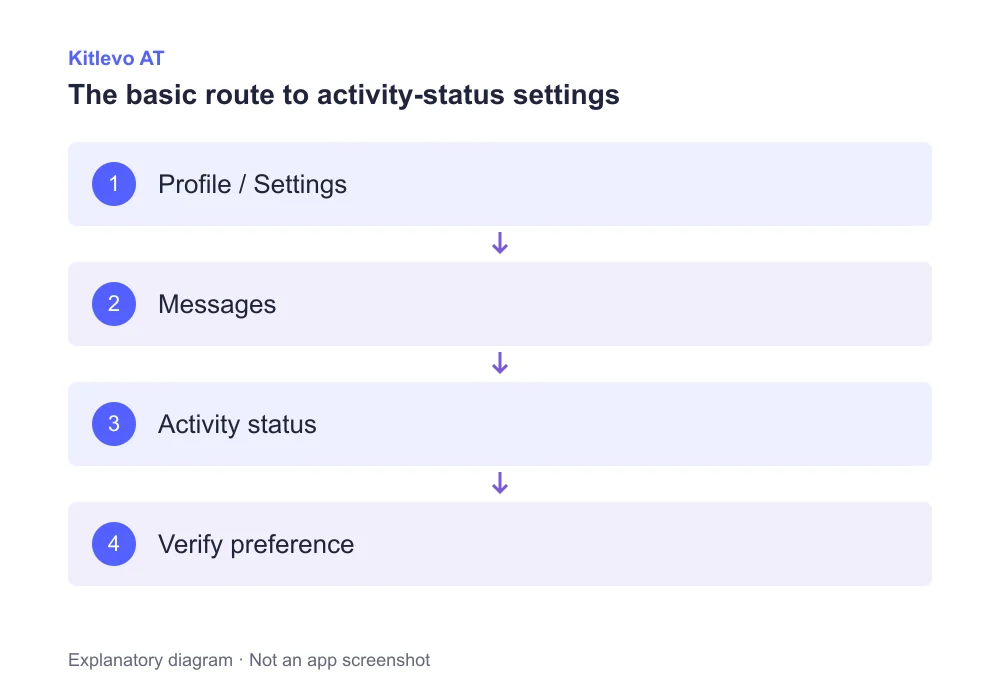
A clear four-step starting point
Choose your profile
Verify which account should receive the preference.
Find the control
Open Messages and story replies, then activity status.
Turn visibility off
Change Show Activity Status and check the saved state.
Understand the trade-off
Other people’s activity indicators will no longer be visible to you.
What Instagram activity status tells people
Instagram’s official help describes activity visibility for people you follow and accounts you message when the setting is enabled. It is a limited indicator, not a complete diary of someone’s activity. A dot cannot tell you what the person is doing or who they are talking to.
Turning your activity status off also prevents you from seeing other people’s activity information. Do not expect to hide your own signal while retaining the same visibility into everyone else. The control manages a shared visibility feature; it does not create a private monitoring tool.
How to turn off activity status in the mobile app
Open your own profile, then the menu and settings area. Look for Messages and story replies and the Show Activity Status control. Turn the relevant switch off. If the layout differs, use settings search for activity status rather than searching through unrelated notification options.
If you manage several accounts, confirm which profile you are changing. A device theme setting, disabled phone notifications or a different browser appearance does not replace this Instagram preference. Leave the page and return to check that the selected state has been retained.
A green dot is not a report of someone’s behaviour
Seeing or not seeing an activity indicator does not explain a person’s intentions. Manage the preferences you control, keep the different privacy settings separate, and leave uncertain situations uncertain instead of treating a missing signal as proof.
How to change online status on Instagram web
On the web interface, open More and Settings. The official desktop help places Messages and story replies under how others can interact with you, followed by Show Activity Status. Use the switch provided for that setting and check the selected state.
If an old indicator remains visible on an already open page, do not repeatedly toggle the setting. First confirm the correct account and the saved preference. A delayed display or temporary browser issue is not evidence about the other person’s relationship with you.
Privacy controls that solve different problems
| Control | Main purpose | Not a substitute for |
|---|---|---|
| Activity status | Online and last-active visibility | Message read receipts |
| Read receipts | Whether a message was read | Online-status visibility |
| Sleep mode | Notifications and focus periods | A guarantee of invisibility |
| Private account | An approved audience for private content | Activity-status preferences |
| Restrict | Managing interactions with an account | One global setting for everyone |
Why someone’s activity status may not be showing
A missing indicator may relate to your own preference, the other person’s settings or the conditions under which Instagram provides visibility. It does not, by itself, prove that you were blocked or singled out. Connection and display delays can add further uncertainty.
Use a short check of your own account: are you signed into the intended profile, is the preference set as expected, and is the screen current? Creating additional accounts to watch another person or seeking unauthorized access is not a troubleshooting step. Focus on settings you control rather than explanations you cannot verify.
Activity status, read receipts and Sleep mode are separate
Sleep mode is designed around notification management and focus periods. It is not simply another name for the activity-status switch. Read receipts answer whether a message was read, whereas online visibility describes a different signal. Do not use one setting as proof that another has changed.
Kitlevo AT does not change these Instagram privacy preferences for you. Its accessible-list analysis should be considered separately from your online visibility. Use Instagram’s own settings for this task and the Kitlevo features overview when your goal is organizing or comparing follower information.
Frequently asked questions
Where can I turn off Instagram last active status?
Look in settings for Messages and story replies and Show Activity Status. Exact labels or placement can vary by version.
Can I still see other people’s activity when mine is off?
Instagram’s help says switching activity status off also prevents you from seeing other people’s activity information.
Does turning off active status disable read receipts?
No. Activity visibility and message read receipts are separate controls.
Is Sleep mode the same as hiding online status?
No. Sleep mode manages focus periods and notifications. Do not treat it as a replacement for the activity-status preference.
Does a missing activity indicator mean I am blocked?
Not by itself. Your settings, the other account’s preferences and visibility conditions can affect the signal.
Does Kitlevo AT change my activity-status preference?
These settings are managed through Instagram itself. Kitlevo AT is not presented as an invisibility tool or a way to reveal someone else’s hidden status.
Official sources
Bring clarity to your audience records
Explore Kitlevo AT’s accessible follower lists, saved records and comparison tools.