
Downloading Instagram data gives you a copy of information associated with your account. It is not a live analytics dashboard. The profile, date range, categories and time of preparation all affect what the archive can tell you.
Begin with the question you need to answer. If you only want to inspect connections, a full collection of messages and media may be unnecessary. This guide focuses on a narrow, readable request and a deliberate review of the files before you share or compare them.
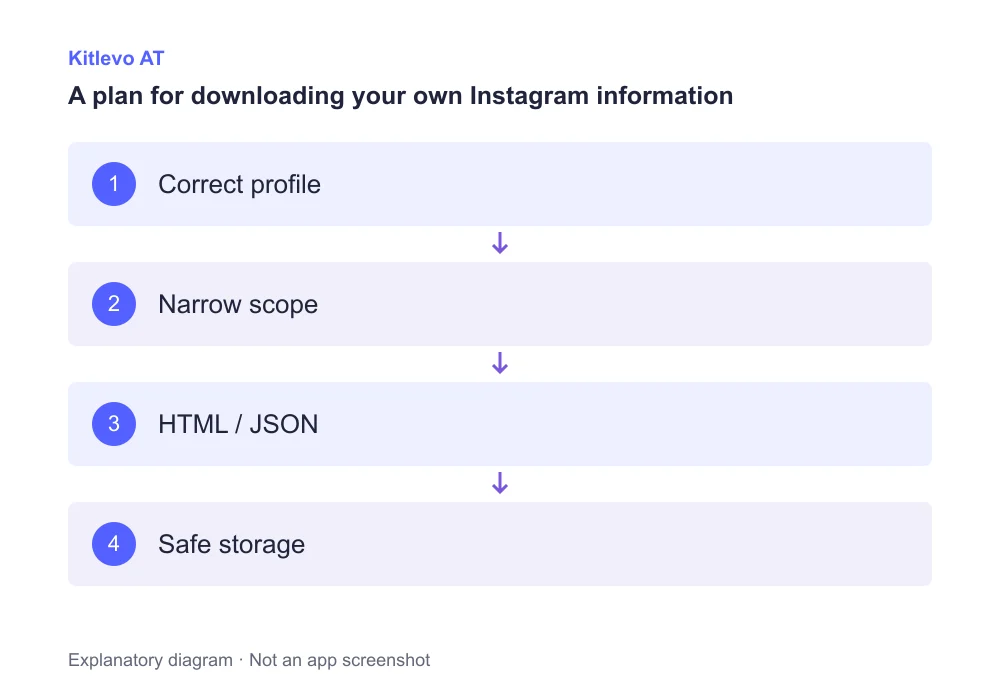
A clear four-step starting point
Define the question
Decide whether you need connection records or a broader personal backup.
Limit the scope
Confirm the correct profile, available categories and date range.
Choose a format
Use HTML to read, or supported JSON for structured processing.
Inspect before sharing
Check dates, coverage and private fields before any upload.
Request your information through Accounts Center
Open Instagram settings and find Accounts Center. Follow the information download or export option available for your account. Meta has brought Instagram and Facebook information download controls into Accounts Center, so pay particular attention to the selected profile when several accounts are connected.
Review the categories, date range and format choices actually shown. Confirm whether the request covers one Instagram profile or several accounts. Labels may change between app versions; follow the official flow on your screen rather than an outdated shortcut copied from an old tutorial.
The current official help also notes a gradual move to Meta Account settings. In that layout, open Your information and permissions → Export your information → Create export, choose the profile and select export to device. If your account still shows Accounts Center, use the official flow provided there.
Choose HTML for reading or JSON for structured work
An HTML archive is a useful starting point when you want to browse the supplied information yourself. JSON is useful for structured inspection or processing in a compatible tool. If a format choice is offered, choose based on your purpose rather than assuming that one format automatically contains more accurate information.
A JSON file is not an Excel workbook. It may contain nested fields, timestamps and several related files. Renaming a file to end in .csv does not convert its contents. Before importing anything, check the structure and the formats supported by the tool you plan to use.
Check the scope before comparing the numbers
A more useful archive starts with a clearer question, not simply a larger download. Inspect a few entries, keep relationship directions consistent, and preserve the date of each source. This prevents a missing category from becoming a false claim about a follower change.
Understand a downloaded follower list before comparing it
If the archive includes follower or following records, inspect their scope. Folder names and file layouts can change. Read a few example entries to verify which direction of the relationship the file describes and whether the chosen category actually answers your question.
For an illustrative example, an archive might contain 120 records while the current profile displays 122 followers. That difference alone does not prove corruption. The archive date, selected categories and the time represented by the live count are separate checks. Do not force records from different dates to match as though they were captured simultaneously.
Formats and what they are useful for
| Option | Useful for | Check first |
|---|---|---|
| HTML | Reading in a browser | May include multiple pages or folders |
| JSON | Structured processing in a compatible tool | Not an Excel file by itself |
| Connection records | Reviewing followers and following | Confirm categories and dates |
| Full archive | A broader personal backup | May include sensitive messages |
| Current profile | Checking today’s visible total | Not necessarily the archive’s time |
What to do while an export is preparing or appears incomplete
There is no universal preparation time we can promise. Follow the status shown for your request rather than submitting repeated duplicate requests. When a notification arrives, inspect the sender and destination domain before opening its link or entering account details.
If a field is missing, return to the profile, date range and category selection. Look for additional archive parts or folders. An empty result can mean the requested export did not include that information; it does not establish that the information never existed. Record the limitation before using the file as evidence.
Keep private material out of unnecessary uploads
A full archive can contain messages, contact details and information involving other people. Do not attach the complete ZIP file to a public support thread or unrestricted sharing link. If you need help with one field, isolate the relevant structure and remove personal values that are not necessary to explain the problem.
Before using Kitlevo AT’s Instagram Archive Analysis area, read the accepted-file guidance shown there. Archive analysis does not replace Instagram’s own export request or unlock private profiles. After finishing, review downloaded and temporary copies on shared computers, and retain only what you actually need.
Frequently asked questions
Where can I download Instagram data?
Open Accounts Center from Instagram settings and follow the information download or export flow available for the selected profile.
Should I choose HTML or JSON?
HTML is convenient for reading. JSON is intended for structured processing. Check both the offered options and the formats your intended tool supports.
How long does an Instagram data download take?
We do not guarantee a fixed preparation time. Follow the status displayed for your request.
Can I rename JSON to CSV to use it in Excel?
Renaming the extension does not convert the data. Use an import or conversion method that understands the actual structure.
Why does the downloaded follower count differ?
The export date, categories and coverage can differ from the current profile. Verify the same relationship type and time context before comparing.
Should I upload my entire Instagram archive to an analysis site?
A complete archive may contain private data. Review the fields processed and the privacy terms, and use only the necessary files whenever possible.
Official sources
Bring clarity to your audience records
Explore Kitlevo AT’s accessible follower lists, saved records and comparison tools.