
Seeing less of someone’s content and limiting how they interact with you are different goals. Instagram’s mute, restrict and block controls are not interchangeable. Choose the outcome you need before choosing the strongest-sounding button.
This guide explains what restrict means on Instagram and compares it with muting and blocking. The focus is on managing your own experience and boundaries, not revealing someone else’s private content or identifying hidden personal intentions.
A clear four-step starting point
Name the need
Less content, reviewed interactions, or a stronger contact boundary?
Compare controls
Read what mute, restrict and block actually manage.
Check the scope
Verify the account and the explanation before applying a choice.
Review separately
Check comments, messages and story-audience preferences individually.
What does restrict mean on Instagram?
Restrict is designed to manage interactions with a particular account. Meta explains that new comments from a restricted account initially remain visible to that person unless you choose to approve them. Messages are moved to requests, allowing a different review workflow from an ordinary conversation.
It is not a follower-list filter and does not unlock private profiles. Read the explanation provided on the account’s control screen before using it. If you later remove the restriction, review comment and message handling separately rather than assuming every privacy preference changed together.
What muting an account is useful for
Muting helps shape the content you see. If you want fewer posts from someone while keeping the follow relationship, this is closer to that need. Read the offered post and story choices individually instead of assuming that one switch covers every kind of content.
Muting content does not mean the person can no longer contact you. Muting phone notifications is also a separate action. If your real problem is interruptions during work hours, notification settings or Sleep mode may be a better fit than changing how a particular account appears in your feed.
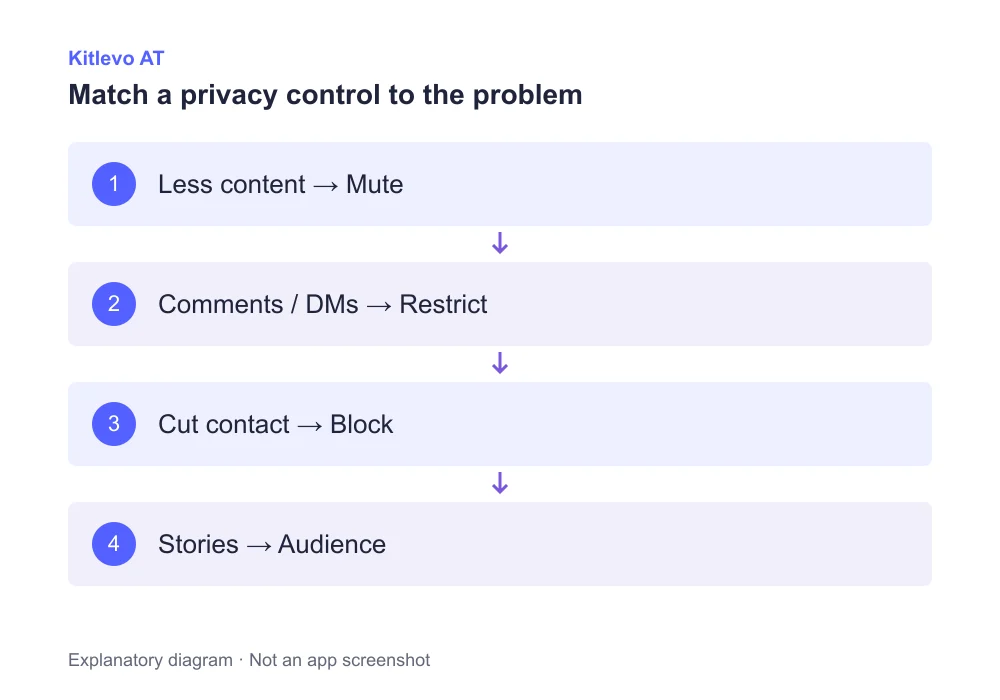
Choose the boundary, then choose the control
Less content, moderated interactions and ending contact are three different decisions. Starting with the intended outcome helps you avoid changing a relationship when you only wanted a quieter feed.
How blocking differs from restriction
Blocking is a separate control for creating a stronger boundary with an account. Restrict should not be treated as merely an invisible version of blocking. Their effects on communication and access are not identical, so choose based on the problem you are trying to solve.
For threatening or unwanted contact, consider Instagram’s reporting and safety options as well as relationship controls. No single setting should be described as a guarantee that a person can never create another identity or encounter a copy of information somewhere else online.
Mute, restrict and block solve different problems
| Your goal | Control to review | Important limit |
|---|---|---|
| Less content in your feed | Mute | Does not end every form of contact |
| Review interactions first | Restrict | Not a complete content-privacy control |
| Cut contact with an account | Block | Not a guarantee against every new identity |
| Manage online visibility | Activity status | Separate from read receipts |
| Choose a story audience | Story privacy | Not the same as muting |
Read receipts, activity and story visibility
Meta says a restricted account cannot see whether you have read its messages or whether you are active. This is not the same action as turning off your general activity-status setting for everyone. A control applied to one account and an account-wide preference solve different problems.
Restriction should not be used as a promise that every story is hidden from that person. Review story audience and account-privacy controls separately when content visibility is the goal. A label on an interaction setting is not a complete description of the audience for all your content.
Three practical decisions, not one universal answer
If a friend posts frequently and you simply want less of that content, review mute options. If you need to review a particular person’s comments before others see them, read the restriction controls. If you need to cut contact with an account, review blocking and reporting where appropriate.
Kitlevo AT organizes accessible follower and following information. It does not identify who secretly muted or restricted you. A saved list cannot reveal a person’s motive or private preferences. Manage your own Instagram controls directly and keep audience-list analysis as a separate task.
Frequently asked questions
What does restrict mean on Instagram?
It is a control for managing comments and messages from a particular account. It is not equivalent to blocking.
Can a restricted account still send messages?
Restriction does not close messaging in the same way as a block. Meta describes moving those messages into requests.
Can restricted accounts see my activity or read receipts?
Meta says restricted accounts cannot see that information. This is separate from your general activity-status preference.
Is muting the same as unfollowing?
No. Muting is a way to manage content you see without ending the follow relationship.
Does restricting someone automatically hide my stories?
Do not assume so. Manage story audiences and account privacy separately when controlling who can view content.
Can Kitlevo tell me who restricted or muted me?
No. Kitlevo AT is not presented as a way to reveal another person’s hidden privacy preferences or intentions.
Official sources
Bring clarity to your audience records
Explore Kitlevo AT’s accessible follower lists, saved records and comparison tools.